
FIFA World Cup AI photo prompts
Choose a fan-photo scene, adapt a complete prompt, and check the result against your source portrait.
TL;DR
The shortest version before the full guide.
- Start with one clear portrait and choose whether you want a fan portrait, outfit edit, stadium scene, or wide broadcast-style composition.
- These are creative templates for an editor that accepts an uploaded image and written instructions. MogScore's World Cup generator is archived.
- Describe country colors, scene, framing, and the features you want preserved.
- Keep broadcast details fictional and fan styling generic; the image is not an official FIFA asset or match record.
- Compare the result with the original before keeping it; identity-preservation instructions do not guarantee an unchanged face.
Choose a scene before writing the prompt
A useful World Cup AI photo prompt tells an image editor what to change and what to keep. Decide on the composition first: a close fan portrait, a clothing edit, a stadium scene, or a wider sports-TV-style frame. That choice determines how much background and shoulder space the edit needs.
These templates are for an editor that accepts an uploaded portrait and written editing instructions. MogScore's World Cup generator is archived; the current AI Hairstyle tool uses hairstyle controls, not a World Cup scene selector or custom prompt field.
- Fan portrait: keep the face prominent and add a scarf or subtle cheek paint.
- Outfit edit: make a generic football fan top the main change; keep the existing background if possible.
- Stadium scene: add seating, crowd blur, and matchday atmosphere around the subject.
- Broadcast-style composition: use a wider frame and sports-TV lighting. Keep any graphic strip fictional, or leave text out entirely.
Pick a source portrait with room for the edit
Use a single-person image with a recognizable face, visible shoulders, and clear hair edges. Leave space around the head for accessories or a wider crop. A close crop may require the editor to invent more of the clothing and background.
- Choose one visible person.
- Avoid sunglasses, hands across the face, and heavy beauty filters.
- Keep the face sharp and the expression easy to compare.
- Leave shoulder and edge space for the scene you chose.
If your only photo is a tight selfie, begin with a close fan portrait. You can try a wider scene later, after checking how well the simpler edit preserves the person. The photo-selection guide explains how to choose between existing portraits; the camera guide covers taking a replacement.
Copy and adapt one complete prompt
Use this as an editorial template, not a tested promise about a particular model. Replace the bracketed details before sending it to your editor.
Country colors describe a palette. For example, sky blue and white can guide an Argentina-inspired scarf, while yellow and green can guide Brazil-inspired fan clothing. In this guide, the clothing remains generic rather than recreating official kits.
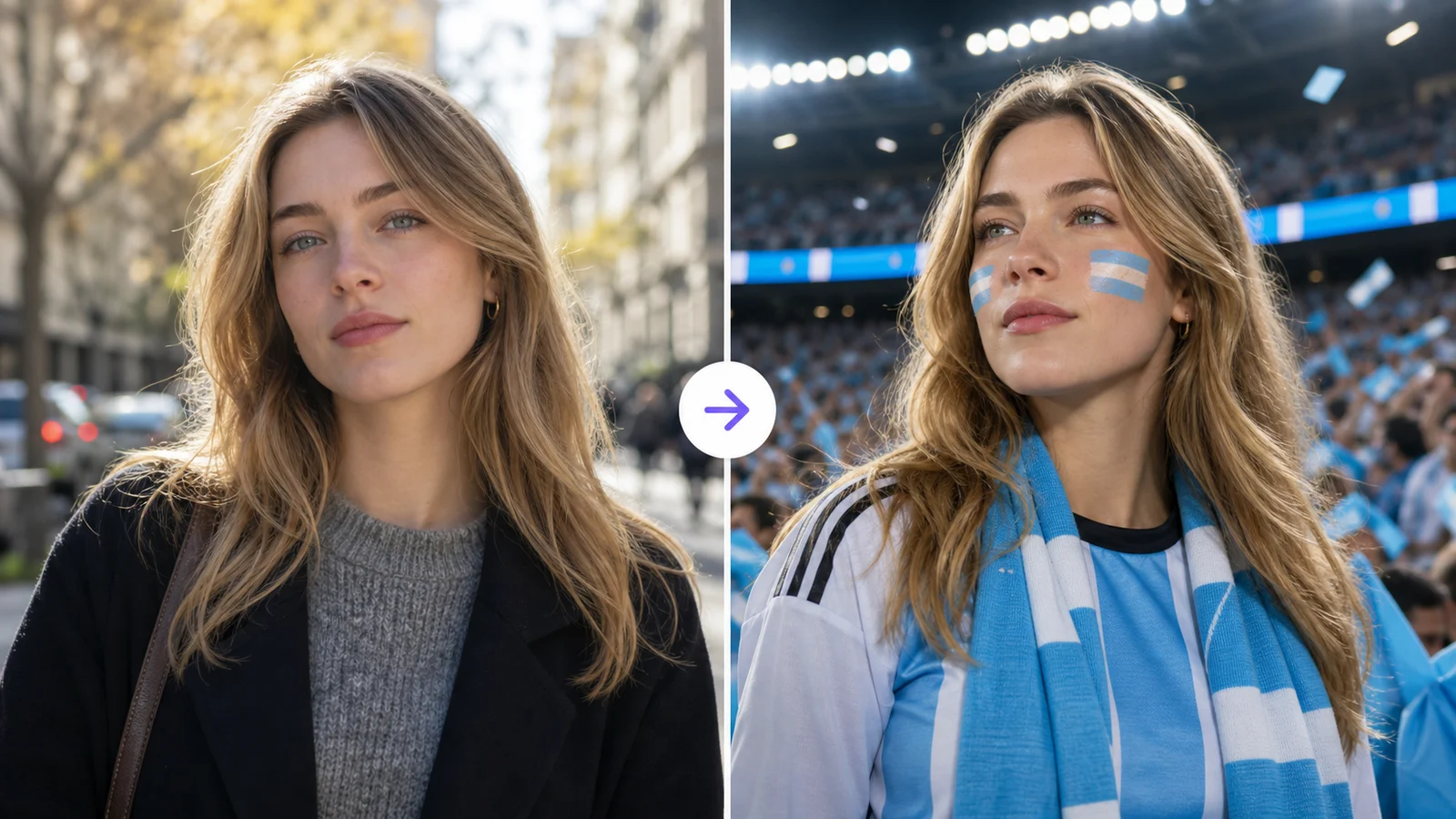
Argentina-inspired broadcast example
Here is a complete version for a wider fan composition:
Creative planning illustration. It demonstrates a possible composition, not verified output from the prompt above or an official match screenshot.The illustration shows the intended relationship between portrait and scene. Check your own result independently: a similar background does not mean the editor kept the face unchanged.
Adapt the prompt to another scene
Change one scene instruction at a time so you can tell which change helped. Keep the source portrait fixed.
A closer fan portrait
Replace the scene instruction with: “Keep a close head-and-shoulders composition. Add a scarf in the chosen colors and a softly blurred football crowd behind the subject.” Start here when your source image has little room around the shoulders.
A generic jersey-style outfit
Replace it with: “Keep the original background and pose. Change the top to a generic football fan shirt in the chosen colors, with believable fabric folds and no crest, sponsor mark, or manufacturer logo.” This keeps the outfit as the main editing task.
A wider stadium image
Replace it with: “Use a waist-up composition in a generic stadium concourse with visible seating and natural daylight. Keep the uploaded person as the main subject.” Inspect any newly generated hands and clothing because the source may not show those areas.
Review the result before keeping it
Compare the generated image directly with the original. Review the person first, then the added scene.
- Face: check whether the features, expression, and skin texture still resemble the source.
- Edges: look around hair, ears, scarf, and clothing for overlapping or disconnected shapes.
- People: check for extra faces or a crowd figure merged with the main subject.
- Graphics: remove invented scores, unreadable text, or marks that make the image appear official.
- Composition: confirm that the crop works for where you intend to use the image.
If the face changed, return to the original portrait and simplify the edit. If the person is recognizable but the scene is cluttered, reduce the crowd and accessories. Repeatedly editing an already altered face can make it harder to compare with the original.
What this guide's examples mean
The prompts and review steps are MogScore editorial guidance, not a measured comparison of image models. The existing before-and-after illustration is a creative example. MogScore is not affiliated with FIFA, and these templates describe fictional fan compositions rather than official tournament assets or real match evidence.
Choose the portrait you want to edit before choosing the scene. A source photo with clear facial detail gives you a reference you can actually use when reviewing the result.
Frequently Asked Questions About FIFA World Cup AI Photo Prompts: Fan Portrait and Stadium Templates
Answers to common questions about this guide.
Use the guide with a current-photo preview
Start with one clear photo, then use the guide to decide which setup or style change to test next.
Related articles
Continue with the next setup, glossary, or product guide.
 Photo TipsBest Photo for an AI Face RatingChoose one usable original from your photo library, record why it works, and fix the specific problem if the scan fails.
 How-toCamera Setup for Repeatable Face Photo ComparisonsMake a repeatable baseline, keep a capture note, and run one useful retake without changing the whole setup.